Find it on the Halo calendar
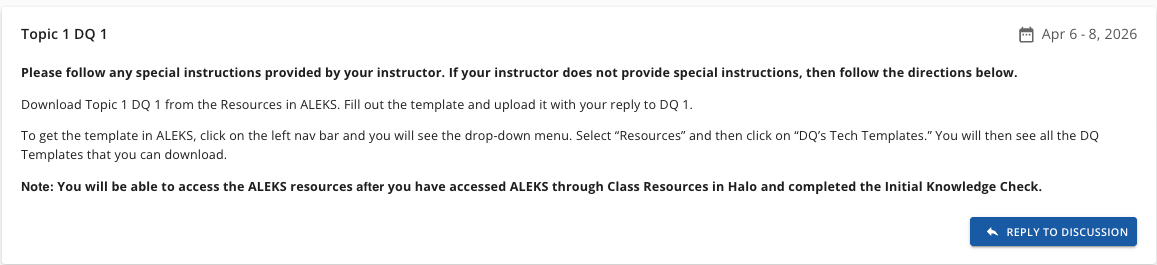
Open Halo, go to the course calendar, and find the week's DQ card (e.g., Topic 1 DQ 1). Every DQ is visible from day one — nothing unlocks late.
Every week has two Discussion Questions. Download the template, fill it out, upload it back to Halo. That's the loop.
Discussion questions are not graded in your section, so nothing on this page is required of you. It is still worth reading: these walkthroughs work through problems that appear nowhere else on the site, and the Topic 5 walkthrough covers frequency distributions, which are on Exam 3.
Every DQ — Excel or written — follows the same submission flow in Halo. Download what you need from ALEKS, fill it in, bring it back, attach it, post.
Open Halo, go to the course calendar, and find the week's DQ card (e.g., Topic 1 DQ 1). Every DQ is visible from day one — nothing unlocks late.
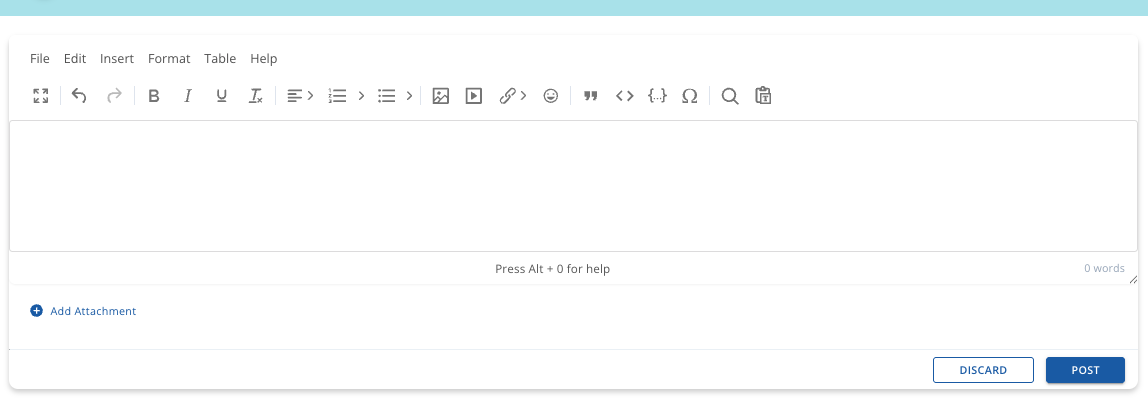
Click into the DQ card to read the prompt. When you're ready to submit, click Reply to Discussion — that's the button that opens the post editor.
In ALEKS, open the hamburger menu (top-left), go to Resources, then DQ's Tech Templates. Download the matching template plus the guidance Word doc.
Open the template in Excel. Before anything else — type your name in the space provided. It's the required first move on every DQ template.
Work through the cells. Some templates are a single sheet; others are a tabbed workbook. Everyone works from the same numbers — there's no randomization.
Back in Halo's post editor, click Add Attachment, pick your saved file, and hit Post. You don't need to type anything in the message body — the file itself is the submission.
Every DQ Excel workbook uses the same four-color legend for input cells and the same self-check colors for answer cells. Once you've internalized this, every workbook reads the same way.
=)The pattern is the same across all seven topics: the week's first DQ is due Wednesday, the second by Friday. If you like working ahead, you can — every DQ is unlocked from day one.
The week's opening DQ — typically the warm-up that walks through the topic's first core concept. Due by end of day Wednesday.
The week's second DQ — usually a stretch on what DQ 1 set up. Due by end of day Friday so you can roll into the weekend with the topic closed.
Each card opens that DQ's walkthrough on this site. A tick means you've opened it on this device.
0 of 14 opened.
Of the 14 DQs, 12 use an Excel template. Two are written responses uploaded as a Word document — same Halo flow (Reply to Discussion → Add Attachment → Post), different file. Check each DQ's on-topic page for the specific prompt and format.
When you open the template folder in ALEKS for either of these, the download is a Word doc instead of a workbook. The submission flow itself is unchanged — open the DQ in Halo, click Reply to Discussion, attach the document, post. See each DQ's page for prompt detail.
A written draft that feeds into the APA-style analysis you submit for Major Assignment 2 later in Topic 4.
Your closing written response on how the term went — what clicked, what didn't, what you'd take forward.
None of these are hard. All of them save you a re-submission.
The ALEKS Resources folder (where the DQ templates live) doesn't appear until you've accessed ALEKS through Halo's Class Resources and finished the Initial Knowledge Check. If you can't see the folder, that's why.
A tidy naming pattern. Not required — but a consistent name makes it obvious what you're submitting and keeps your desktop tidy when you're juggling 14 templates.
Every template has a type your name here cell. Confirm it's filled in before you save — a forgotten name cell is a common reason DQs come back for resubmission.
The Halo DQ card starts with "Please follow any special instructions provided by your instructor." If your instructor says something different from this page, their guidance takes priority.
Template missing, upload failing, or you can't see the ALEKS Resources folder — start here.